

Pillar guide
What Is IPTV and How Does It Work?
By CatchON TV Support TeamPublished
On this page
IPTV (Internet Protocol television) is television delivered as data over an IP network instead of through an aerial, a satellite dish or a cable TV signal. A server sends the video in small packets, your broadband carries them, and an app or set-top box reassembles them into live channels or on-demand programmes on your screen.
That one idea covers a wide range of services, from a phone company’s TV package delivered through its own set-top box to an app on a Firestick. This guide explains what is common to all of them, where they differ, and what you need at home to watch.
What is IPTV? The definition
The International Telecommunication Union, which sets global telecom standards, defines IPTV as “multimedia services such as television/video/audio/text/graphics/data delivered over IP-based networks managed to support the required level of QoS/QoE, security, interactivity and reliability” (ITU-T).
In plain terms: the TV signal is turned into ordinary internet-style data. Traditional broadcast TV pushes every channel down the line at once and your tuner picks one. IPTV only sends the channel or programme you ask for, when you ask for it. That is why IPTV can offer pause, rewind and on-demand libraries, and why it depends on your internet connection.
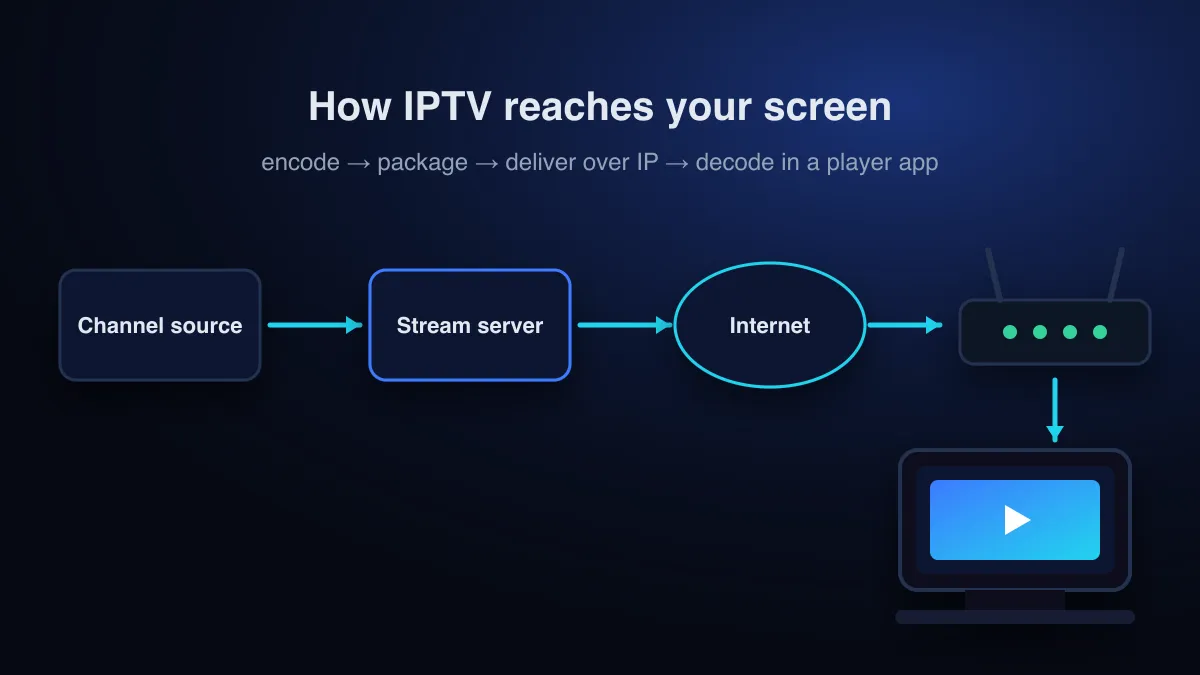
How IPTV works, step by step
Whatever the service, an IPTV stream passes through the same four stages.
- Capture and encode. Each channel’s feed is compressed with a video codec such as H.264 (AVC) or H.265 (HEVC). Compression is what makes an HD channel small enough to send over a home broadband line.
- Package. The encoded stream is cut into short segments and described by a playlist. A common packaging format is HTTP Live Streaming (HLS), whose playlist files are derived from the M3U format (RFC 8216). The M3U playlist guide explains how those files look.
- Deliver over IP. Servers send the segments across a network to your router. On a telecom operator’s own network this traffic is managed end to end; on the open internet it travels like any other web traffic.
- Decode and play. A player, either an app or a set-top box, requests the playlist, downloads the segments a few seconds ahead of what you are watching (the buffer), decodes them and shows the picture. The same player usually displays the channel list and the programme guide.
The buffer is the part viewers notice. If segments arrive more slowly than they play, the buffer empties and the picture stops. That is the “buffering” wheel, covered in detail in the buffering troubleshooting guide.
Managed IPTV vs internet IPTV
“IPTV” is used for two quite different set-ups. Knowing which one someone means clears up most confusion in reviews and forums.
| Managed (operator) IPTV | Internet (over-the-top) IPTV | |
|---|---|---|
| Who runs the network | Your broadband provider, end to end | Nobody end to end; it crosses the public internet |
| How you watch | The provider’s set-top box | Apps on TVs, sticks, phones and computers |
| Quality control | Bandwidth reserved for TV | Shared capacity; depends on your connection and the server |
| Typical use | Pay-TV packages bundled with broadband | Streaming subscriptions and IPTV services |
| Works on any broadband? | No, only on that provider’s lines | Yes, any connection that is fast enough |
Most people searching for “IPTV” today mean the second kind: a subscription you use through an app over any internet connection. That is also how CatchON TV works.
IPTV vs cable, satellite and streaming apps
| Cable / satellite | IPTV subscription | Streaming apps (on-demand) | |
|---|---|---|---|
| Signal | Broadcast over coax or from a satellite | IP data over broadband | IP data over broadband |
| Live channels | Yes | Yes, the main feature | Mostly no; some add live TV |
| Hardware | Provider’s box, dish or cable line | Any device that runs a player app | Any device with the app |
| Programme guide | Built into the box | EPG loaded by the player | Not applicable |
| Needs fast internet | No | Yes | Yes |
Technically, on-demand streaming apps and IPTV use the same building blocks. The practical difference is the experience: IPTV is organised around live channels and a programme guide, like a cable package, while on-demand apps are organised around a library you browse.
Live, on-demand and catch-up
- Live TV: channels play as they are broadcast. You join the stream already in progress, exactly like switching channels on a normal TV.
- Video on demand (VOD): films and series stored on the server, which start from the beginning whenever you press play.
- Catch-up (time-shift): recent programmes from a live channel kept for a few hours or days so you can watch them after they aired. Availability varies by service and by channel.
What you need to watch IPTV
| You need | Why | Where to learn more |
|---|---|---|
| A compatible device | Smart TV, streaming stick, Android box, phone, tablet or computer | IPTV box guide |
| A player app | The app turns your login into a channel list and plays the streams | IPTV player apps |
| Login details | An M3U link, an Xtream Codes login or a MAC-portal activation | M3U guide |
| A steady connection | Roughly 3 Mbps per HD stream and 15 Mbps per 4K stream | Speed and devices |
The speed figures are the ones Netflix recommends for HD and Ultra HD streams. Live IPTV channels use comparable bitrates, so they are a reasonable baseline. Stability matters as much as speed: a steady 20 Mbps over Ethernet usually beats a fluctuating 100 Mbps over weak Wi-Fi.
IPTV terms you will see
- EPG (electronic programme guide)
- The on-screen TV schedule. Guide data is usually delivered separately from the channels, often as an XMLTV file (background).
- M3U playlist
- A text file or URL listing every channel and its stream address.
- Xtream Codes login
- A username, password and server URL that lets a player fetch channels, guide data and on-demand content in one step.
- MAC portal
- Activation tied to a set-top box’s hardware address, used by MAG-style boxes.
- Connection
- One stream playing at a time. A two-connection plan lets two screens watch at once.
- Buffer
- The few seconds of video a player downloads in advance to smooth out network hiccups.
Is IPTV legal?
The technology is legal and widely used by licensed broadcasters and telecom operators. What can be illegal is offering channels or films without permission from the people who own them. The full picture, including US and EU law, is in Is IPTV legal?
Choosing a service? Use the IPTV subscription checklist, then see licensed IPTV services compared.
Quick answers
Is IPTV the same as streaming?
It uses the same internet technology. “IPTV” usually means live channels with a programme guide, while “streaming” more often means on-demand libraries.
Do I need a smart TV for IPTV?
No. Any TV with an HDMI port works with a streaming stick or Android box running a player app.
Why does IPTV need a fast connection when cable does not?
Cable and satellite deliver the signal over their own infrastructure. IPTV shares your broadband with everything else in the house, so the connection has to carry the video in real time.
Does IPTV work differently in the UK or Canada?
The technology is the same everywhere, but licensing rules, enforcement and free alternatives differ. See IPTV in the UK (and the guide to UK TV subscriptions) or IPTV in Canada. For the US, see IPTV services in the US compared.
Sources
- IPTV-JCA Terms of Reference (definition of IPTV) — International Telecommunication Union (ITU-T) (accessed )
- Internet Protocol television — Wikipedia (accessed )
- RFC 8216: HTTP Live Streaming — IETF (accessed )
- Electronic program guide — Wikipedia (accessed )
- Netflix-recommended internet speeds — Netflix Help Center (accessed )
Ready to try it on your own TV? The setup guide walks through each device.
Read the setup guide